

WordPress analytics, without the complexity
Install in sixty seconds and see your visitors right inside WordPress
- Up and running in seconds, no configuration needed
- Real-time insights from a clean, simple dashboard
- Privacy-friendly by default, GDPR-compliant
Trusted by 200,000+ websites
Burst is Part of the Team Updraft Family, known for:


Most analytics tools are built for data scientists, not for website owners
GA4 takes weeks to set up properly. Once you’re in, you’re staring at a dashboard full of numbers you didn’t ask for, in an interface that wasn’t designed for you.
Burst is different. It installs like any WordPress plugin, shows you the numbers that matter and stays out of your way.
Burst Statistics offers these features
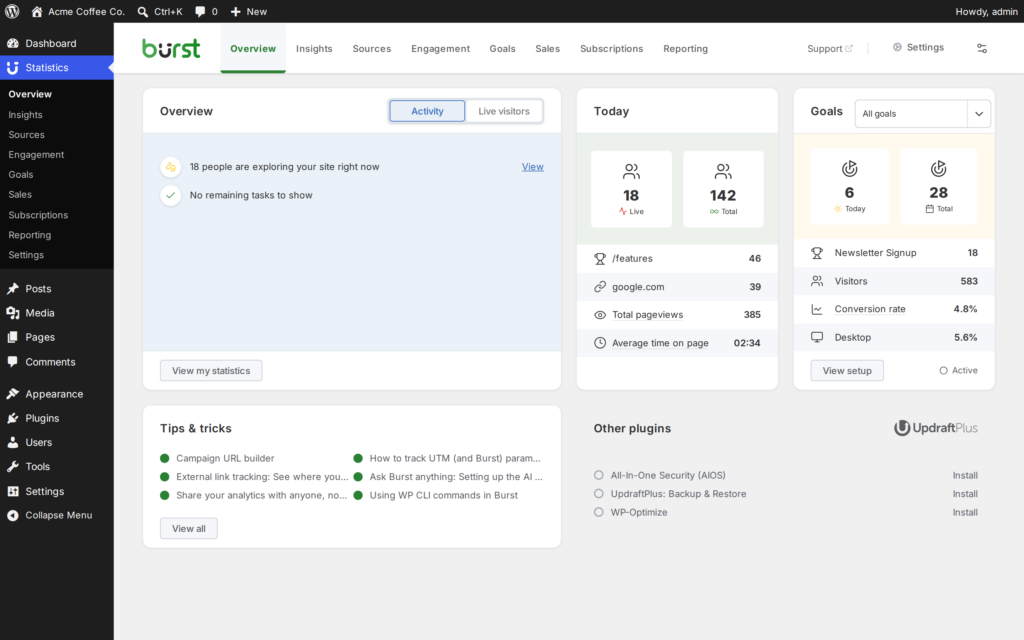
Real-time analytics
See how many people are on your site right now
You sent the newsletter or posted the launch. Is anyone showing up? Open your dashboard and you’ll know now, not tomorrow morning.

Goal & conversion tracking
Count the things you want visitors to do
A goal is one action you care about, like a contact form sent or a click on a buy button. Set one up and Burst counts how often it happens, so you can see if your site is doing its job.
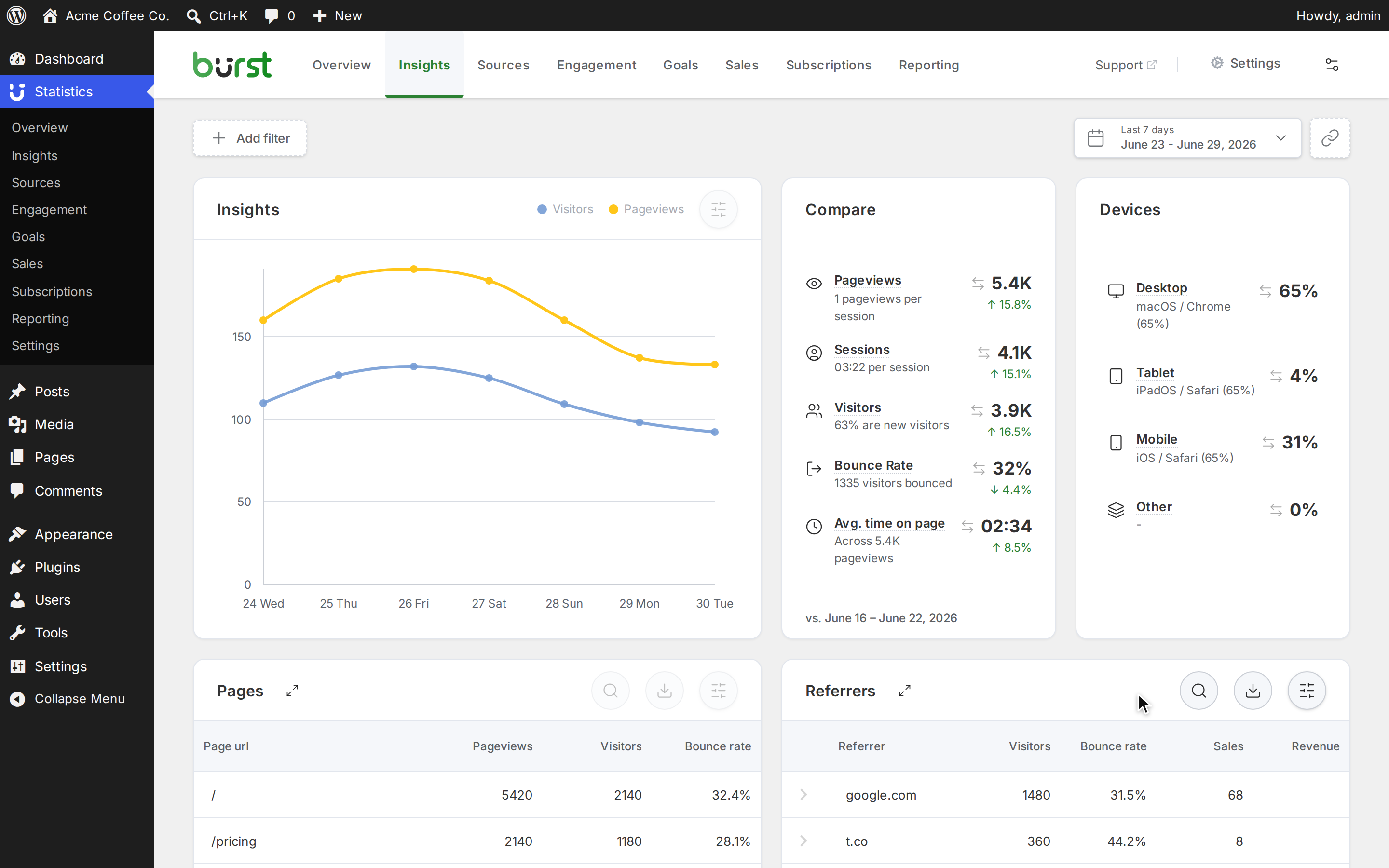
Detailed insights
See how your site is doing, right in WordPress
Burst is a WordPress plugin, so your statistics live in your WordPress dashboard, next to your pages and posts. Open it to see which content works, how many people visit, which devices they use and how that changes over time.
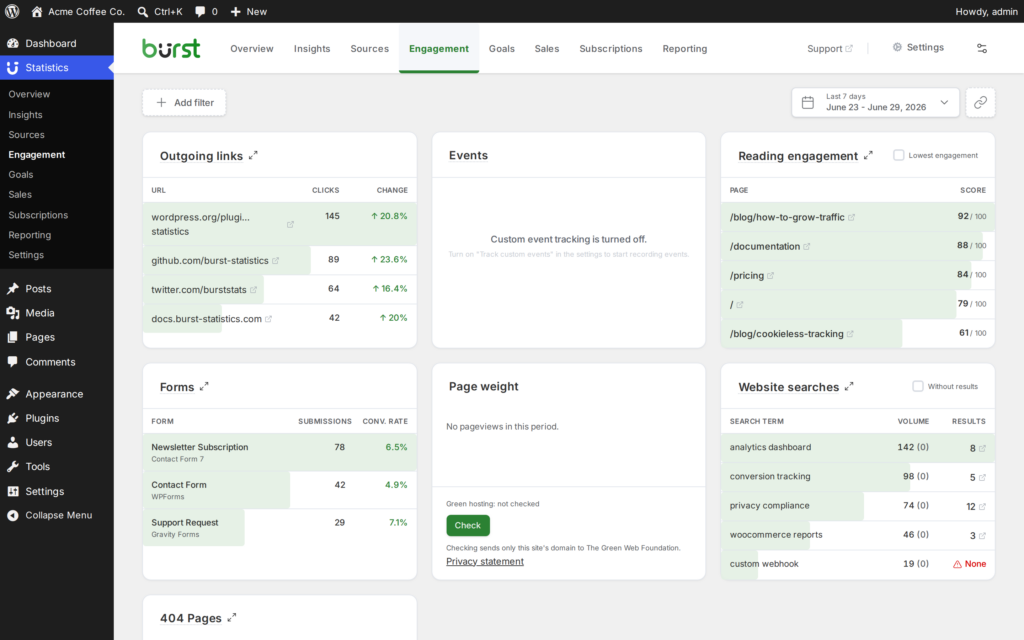
Engagement tracking
Find what’s broken, missing or ignored on your site
Use the Engagement page as a to-do list for your site: links that lead nowhere, searches with no results, pages people skim, forms that don’t get sent and outgoing links that do or don’t get clicked. It’s all in your WordPress dashboard.
AI & MCP
Ask your statistics a question
Ask about your traffic in plain language, start reports with a short summary, or connect AI software that supports MCP. You choose the AI provider, and it can read your statistics but not change them. None of it runs until you set it up.
Install for free in three simple steps
1. Install the plugin
Search “Burst Statistics” in your WordPress plugin directory and install in one click. No files to upload, no FTP.
2. Activate it
Hit activate. Burst starts collecting data immediately. No configuration, no setup wizard, no tracking code to paste.
3. See your visitors
Open your WordPress dashboard, and your analytics will show up there. Live visitors, sources and goals in real time.
Free forever · No account required · Installs from your WordPress dashboard
A note from the founders
We believe analytics should help you focus, not overwhelm you with clutter.
Before starting Burst, Rogier built Really Simple SSL to be as simple as possible and later he co-founded Complianz, to make it easy to comply with privacy regulations.
Hessel spent years designing WordPress websites and later joined Really Simple Plugins to design clean and easy-to-use interfaces. Cluttered and confusing WordPress plugins have always frustrated us.
That is why every feature in Burst is built around three strict rules: it must be simple, immediately useful and respect your visitors’ privacy. No useless metrics, no confusing menus, and all local within WordPress.
We hope to give you the clarity you need to make good decisions.
Rogier & Hessel, founders of Burst Statistics


Founded in Groningen, the Netherlands
Burst Pro extends with these features
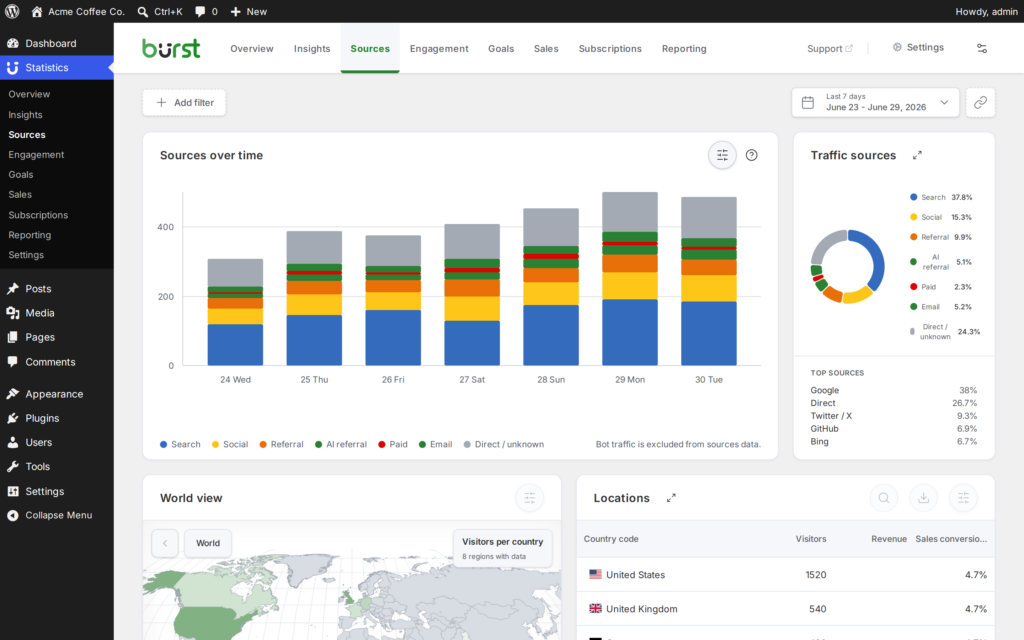
Geographic insights
Find out where your audience actually lives
Burst breaks down your audience by location so you know where to focus your content, which markets are growing and where you’re getting traction you haven’t earned yet.

UTM & Campaign tracking
See which campaigns are worth running again
You sent a newsletter, posted on LinkedIn and ran a small ad. Which one brought the new visitors? Without UTM tracking, you’re making your next move based on gut feel. Burst tracks every parameter automatically, so you always know what’s working
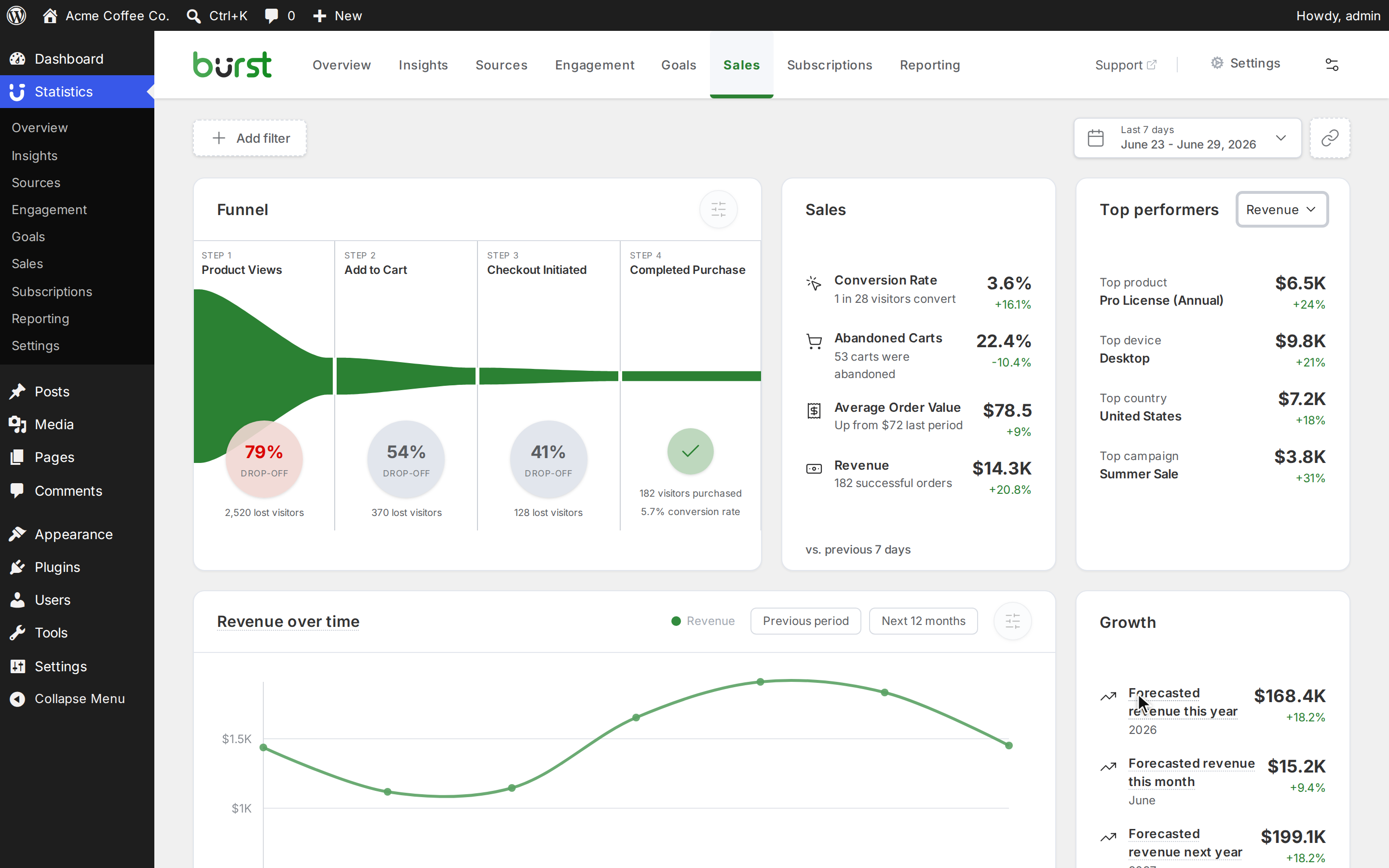
Revenue & sales tracking
See which traffic turns into sales
You know how many people visited your shop and what you sold. Burst connects the two, so you can see where purchases came from and which pages those visits started on. You see totals, not who bought what.
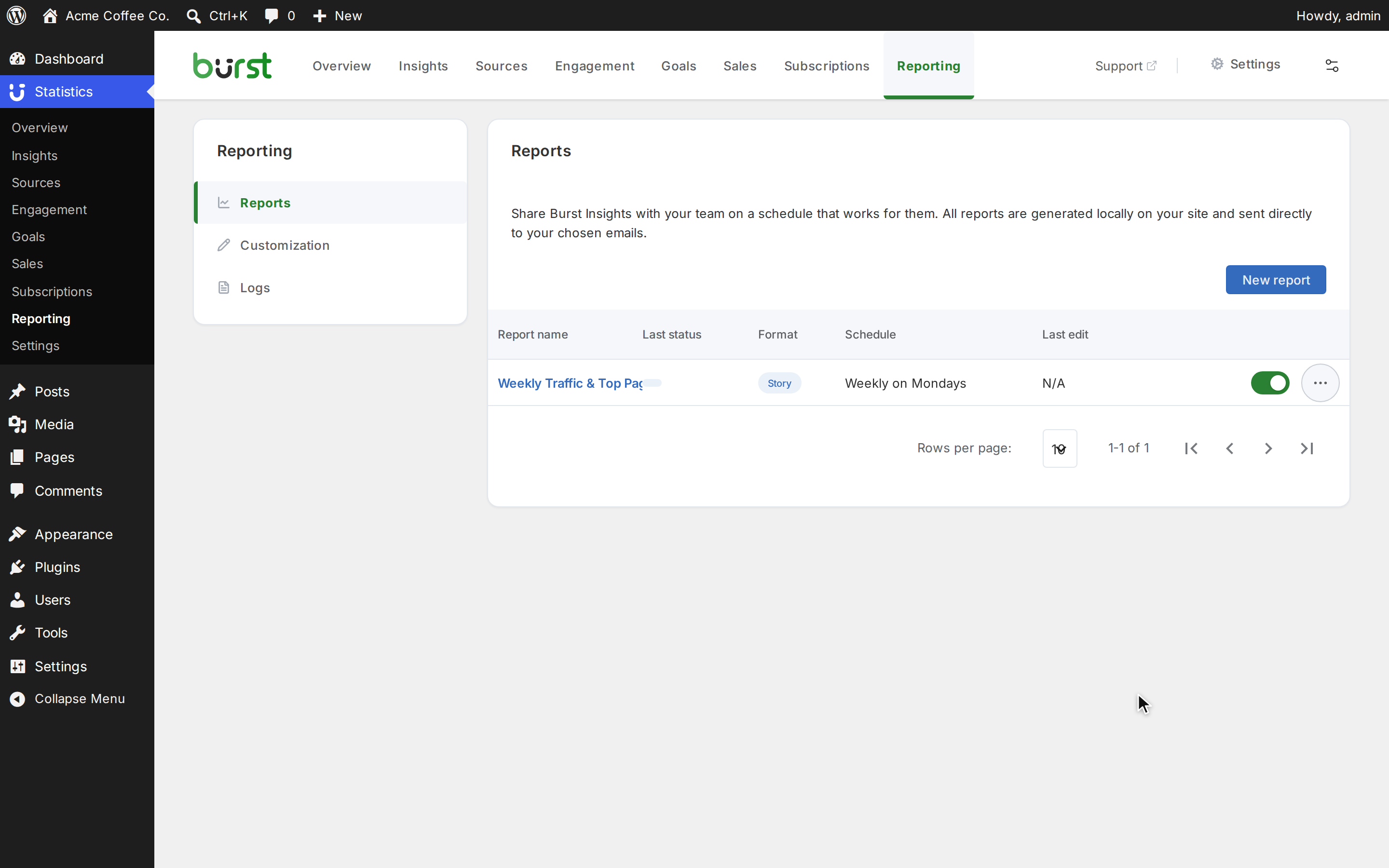
Automated reporting
Professional client reports, sent automatically
Putting together a monthly client report by hand takes time. Burst builds it from your statistics and sends it on a schedule, so you only have to add what the numbers can’t explain.
Engagement tracking
Find what’s broken, missing or ignored on your site
Use the Engagement page as a to-do list for your site: links that lead nowhere, searches with no results, pages people skim, forms that don’t get sent and outgoing links that do or don’t get clicked. It’s all in your WordPress dashboard.
AI & MCP
Ask your statistics a question
Ask about your traffic in plain language, start reports with a short summary, or connect AI software that supports MCP. You choose the AI provider, and it can read your statistics but not change them. None of it runs until you set it up.
Private by default. No setup required.
Your data stays on your site
All analytics are stored in your own WordPress database. We never see it. You have full control over your data.
No cookie banner needed
Burst can track visitors without cookies. Your visitors aren’t followed across the web and you don’t need a consent popup.
GDPR-compliant out of the box
No configuration needed. Burst is built to comply with GDPR, CCPA and other privacy regulations from day one.
What our WordPress users are saying
@marxgal – Verified WP.org review“Excellent plug-in. I had Google Analytics, I installed Burst stats and it gives me the stats I need without all the overhead. My pagespeed score improved too!”
@naturalextractor – Verified WP.org review“A client installed Burst analytics on a site and after looking at it can state I will be using this on clients sites moving forward, due to its ease of use and been able to see all the things I need in one dash.”
@karsten007– Verified WP.org review“Fast as lightning support and very helpful. Great plugin for reasonable price.”
Frequently Asked Questions
What is Burst Statistics?
Burst is an analytics plugin for WordPress that is actually easy to understand and simple to use. Install it, and you immediately see the numbers that matter all from inside your WordPress dashboard.
No tag manager, no external accounts, no complicated setup. It’s lightweight, runs on your own server and keeps your data private by default.
What’s the difference between Burst Free and Burst Pro?
Burst Free gives you clean, essential analytics. Perfect for bloggers and small site owners.
Burst Pro adds advanced tools for webshops and content-rich websites. You get customised email reports, advanced filters, customizable goals, and much more to come!
Does Burst slow down my website?
Burst is built to be fast and efficient. It runs in the background and won’t slow your site down.
Where does Burst store my data?
All data collected by Burst stays on your own WordPress site. We don’t see it, we don’t touch it, and we never sell it.
Unlike others, our business model doesn’t rely on your data, we offer an optional Pro version for users who need more advanced features.
Learn about WordPress Analytics


Try Burst Pro now for free
Get understandable analytics without compromising on privacy, page speed and simplicity. Now risk-free with a 14-day trial!
We offer 14-day trial + 30 day money back guarantee
