14 steps to implement IT automation at enterprise scale
IT organizations can't implement automation all at once. But by following proven steps, they can safely scale workflows while improving governance, efficiency and control.

Automation is vital for modern IT, as it enables IT to accomplish common workflows and repetitive tasks accurately, consistently and quickly. But automation is far from automatic.
The path to implementing automation is fraught with mistakes and waste. Most IT organizations know horror stories about automation: a huge automation project to address a minor automation task; detrimental workflow changes for the sake of automation; and headaches from a poor choice of automation tools. No two automation implementations are alike, so careful planning and concerted effort are critical to implement automation in a meaningful and maintainable way.
Successful automation depends less on tools and scripting and more on governance, operating model design and purposeful rollout. At scale, automation shifts IT from task execution to service orchestration and platform-based delivery.
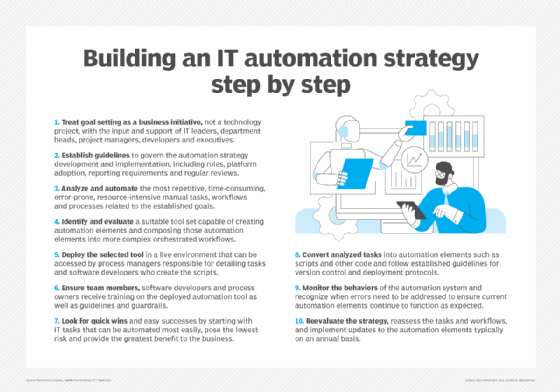
Here are 14 key considerations for operating automation as an enterprise capability.
1. Define automation goals
Goals are the measure of success. An IT automation strategy starts by establishing clear goals for the automation initiative. Planners must clearly understand the problems the business is trying to solve and how automation tools and tactics will address those issues.
Understand what success will look like after one, two or even five years. Even if automation technologies are implemented and working perfectly, the automation initiative can still fail if it doesn't achieve its intended goals.
2. Establish governance
IT automation requires participation from across the business, and it's important to set guidelines to govern the development and implementation of the automation strategy. That typically involves defining roles and responsibilities for the varied automation team participants, such as the automation lead or process owner; setting guidelines for process analysis and automation platform adoption; establishing monitoring and reporting requirements; and requiring regular reviews to ensure that the IT automation strategy remains updated and consistent with business goals while maintaining compliance, continuity and security.
3. Identify high-value operational workflows
With goals and governance in mind, it's time to analyze and understand the current manual tasks, workflows and processes related to the established goals. It's not necessary to analyze every task or process immediately. Instead, focus on the tasks and processes that relate to the goals. The most successful analyses will typically concentrate on the most repetitive, time-consuming, error-prone and resource-intensive tasks. For instance, if a principal goal is to improve business continuity or data protection, a common task to analyze might be backup and restoration processes. The current tasks and processes identified in this step can later be translated into automation elements, such as scripts.
4. Look for automation opportunities
Automation is not an all-or-nothing proposition. Not every process or task should, or even could, be automated within the limitations of the available automation tools and budget. You don't need to automate everything simultaneously to demonstrate automation's business value.
Identify common and frequently performed tasks with minimal complexity. These tasks often benefit most from IT automation. In general, the easy wins for IT automation are processes and tasks IT teams perform frequently, consume the most resources, are error-prone and demand significant time. Common examples include user password resets and VM instance provisioning.
5. Evaluate the automation workflows
Organizations often struggle to translate human workflows into automated workflows. Rule-based automation performs the same steps consistently, while AI-assisted automation might require validation and oversight. Different business and IT processes can use radically different approaches to reach the same result. Also, exceptions to the rules pose serious problems for automation, so complex multibranch tasks are often saved for later in the automation initiative.
Evaluate multiple opportunities for automation, even if you don't intend to implement them all immediately. Consider the current workflows for various tasks across the business and identify common sequences or subprocesses to automate. Teams can then implement and reuse these sequences across automation projects, ultimately enabling orchestration. The more common the sequences or processes, the easier and more effective an automation task will be. In many cases, existing human workflows can be altered or divided to benefit from automation.
Microsoft's PowerShell scripts are a common example of script-based automation, particularly in Windows environments. Organizations also use infrastructure as code (IaC) and cloud automation platforms to automate processes through reusable components and workflows.
6. Consider exceptions and difficulty
With automation projects set, focus on implementation. Automation engineers design processes and decide how to handle exceptions, such as approvals, variables or options. Exceptions can be difficult and time-consuming to implement; IT leaders might opt to automate the simplest processes and leave exceptions for human intervention.
Here's an example in VM provisioning: IT teams can fully automate VM provisioning steps. But the configuration attributes of the VM -- the number of processors, amount of memory and VM image file to deploy -- require manual input and pose exceptions. Another example is a business process automation that requires human sign-off at the end. Automation engineers must design for a mix of automated and human-controlled steps, including delays or erroneous input.
7. Consider security and compliance
All tasks and workflows identified for automation should be carefully reviewed and approved by the stakeholders associated with the automation initiative. Even something as simple as a password reset script should receive consideration from IT, business, security and legal teams. Key considerations include the following:
- IT teams must evaluate system resources and requirements for implementation.
- Business teams need to understand how the effort meets business goals.
- Security teams must review the safety, availability and integrity of the data.
- Legal teams must ensure that automated actions maintain adherence to prevailing regulatory compliance and legislation requirements.
Such cross-platform collaboration also helps to eliminate traditional silos of responsibility that can impair an organization's ability to remediate problems or adapt to changing business environments.
8. Select automation tools, frameworks and AI platforms
Evaluate IT automation tools, platforms and frameworks to suit current and future automation projects. There are IT-centric tools and business workflow automation platforms. Some products are deployed and managed in-house, while others are SaaS. Compare features, capabilities, usability, vendor support and interoperability with other data center or business tools. IT-centric workflow automation tools range from enterprise workflow platforms and IaC products to cloud-native automation services and AI-enabled automation platforms, with examples including Microsoft, ServiceNow, IBM, Red Hat, HashiCorp, AWS and Google Cloud.
However, there are dozens more tools and platforms, often with specializations that can include HR, procurement or software development. More sophisticated offerings can support orchestration, enabling individual automated tasks to be combined into complex workflows and processes.
Organizations can also use generative AI copilots and AI-enabled automation platforms to help create scripts, workflows and automation code. Some tools can build workflows from natural-language prompts or assist with operational tasks. AI-assisted automation requires appropriate governance, testing, security controls and human oversight to ensure reliability and compliance.
Validate the automation tool before committing. Once an automation tool is deployed and used, changing it later can be highly time-consuming and disruptive. Narrow the list of available tools to promising candidates and thoroughly test each finalist using demo versions or other trial options.
9. Study and train
The selected automation tools, platforms or frameworks will typically be used by various business personnel. Software developers often write the initial automation code, though other IT team members -- such as automation system owners -- can become involved. Even project managers, department heads and business leaders can operate automation tools when coding demands are lighter, such as no-code, WYSIWYG and drag-and-drop tools.
This makes training a vital element of any automation initiative. Implement a series of test projects where training can be delivered; participants can become involved in learning the tools and develop a working knowledge of automation development and implementation. Regular training sessions can be important for refreshing automation tool skills and quickly getting new employees up to speed.
10. Prove value through phased rollout
The best way to adopt automation is to prove its value to the enterprise. Implement it on one or two of the easiest tasks or workflows that could free up the most time or effort.
Such fledgling efforts are usually approached as pilot or proof-of-concept projects. Automation owners learn and master the tool or tools for the job while proving their worth to business leaders and teams. Starting small minimizes disruption and culture shock, enabling organizations to identify and resolve issues with the tool or its use.
Each task implementation and rollout should have a suitable support and rollback plan in place. This offers automation users a source of help for questions or problems and allows an automation task to be paused -- or newer code versions to be reverted to previous working versions -- when unforeseen issues arise.
In more mature environments, these pilot automations can evolve into self-service workflows delivered through internal platforms or portals, enabling users to provision and manage services without direct IT intervention.
11. Integrate change management
Change management is a vital part of modern technology and business processes. Careful change management ensures that changes are reviewed, appropriate, implemented correctly by responsible teams and audited, if necessary, to understand what changed and why -- a core issue in business continuity and compliance.
Implementing IT automation alters how changes are requested and managed. Once a task is automated and its behaviors are represented as code, that code typically receives version control and repository support. Changes to the code should then be subject to the same version control and software development standards, such as testing, present in any other software development project. If the IT automation tool isn't already integrated with change management systems, it should be added quickly.
12. Monitor the results
Once the IT team implements an automation tool for tasks or workflows, it should apply metrics or KPIs to measure the effects of automation on the business.
Every task and workflow has a business value, often measured by the cost of workers' hours required to perform it. If automation significantly reduces the time to perform a task, the cost of that task is also significantly reduced. Thus, automation delivers measurable cost savings.
Similarly, automated tasks get done the same way every time, which should reduce mistakes. With fewer errors, automation enhances user satisfaction and reduces time wasted fixing avoidable problems.
Finally, monitoring and observability -- including logs, metrics and traces -- help identify bottlenecks in automated processes and their causes. For example, a provisioning task can fail due to insufficient server memory but can succeed when the right resources are available. Monitoring and observability provide an objective way to gauge automation's value and identify problems for remediation.
13. Expand the rollout
With a small suite of tasks, automated workflows and proven business value, it's time to automate additional tasks systematically. These tasks can be more complex or simpler, but less valuable than those in the first round. Generally, the goal is to focus the automation investment on high-volume, low-risk workflows, sometimes avoiding workflows with exceptions, until automation use within the business matures. There is no established pace of expansion; the growth of automation will depend on the unique business needs, the available staff and knowledge base, and the benefits involved.
Automation performs repetitive tasks in high volume faster than humans can. If a complex task, such as one with user inputs, alternative selections, approvals or other exceptions, is performed only on rare occasions, there might be insufficient overall benefit to automate it. Eventually, the business might opt for orchestration to connect related tasks to accomplish more complex or detailed workflows.
14. Review and optimize
Implementing automation isn't a one-time effort. The data sets used to define an automated process -- such as scripts and predefined visual objects -- require regular review and updates to keep pace with changes in workflows and business needs. That is, does every automated process do what the business needs it to do in a year, two years or five years? Unfortunately, automation maintenance is often neglected or treated as an afterthought. Plan periodic reviews to revisit and revalidate automated processes, but don't stop there.
Infrastructure and business changes are the two principal drivers for automation maintenance. For example, adding new servers might increase compute resources available for automated provisioning. Similarly, a new law might require changes to the steps in an automation process to ensure regulatory compliance. Automation maintenance can be tied to the organization's change management process or business requirements to address these scenarios.
Editor's note: This article was updated in July 2026 to reflect the latest best practices for implementing automation into IT workflows.
Stephen J. Bigelow, senior technology editor at TechTarget, has more than 30 years of technical writing experience in the PC and technology industry.
Executive managing editor, Ryann Burnett, also contributed to this article.